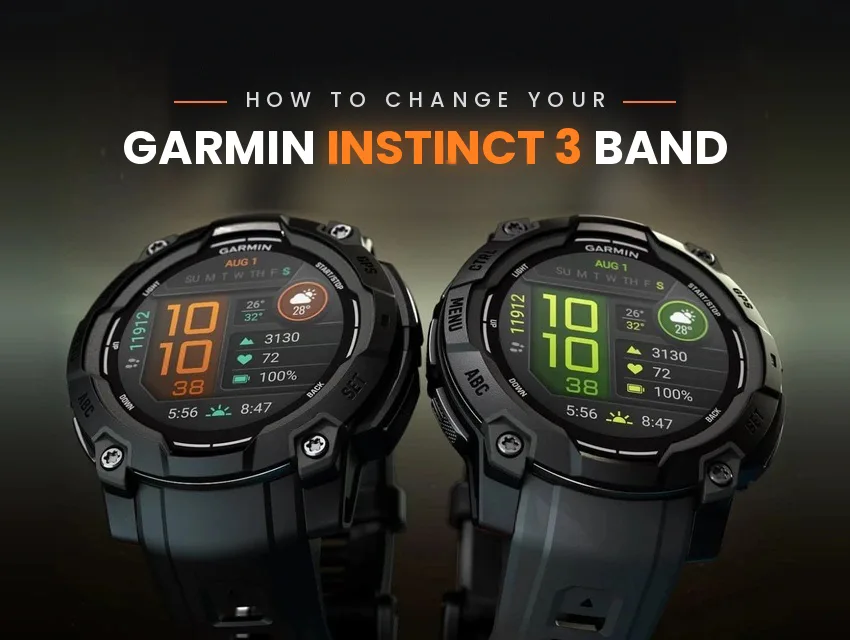
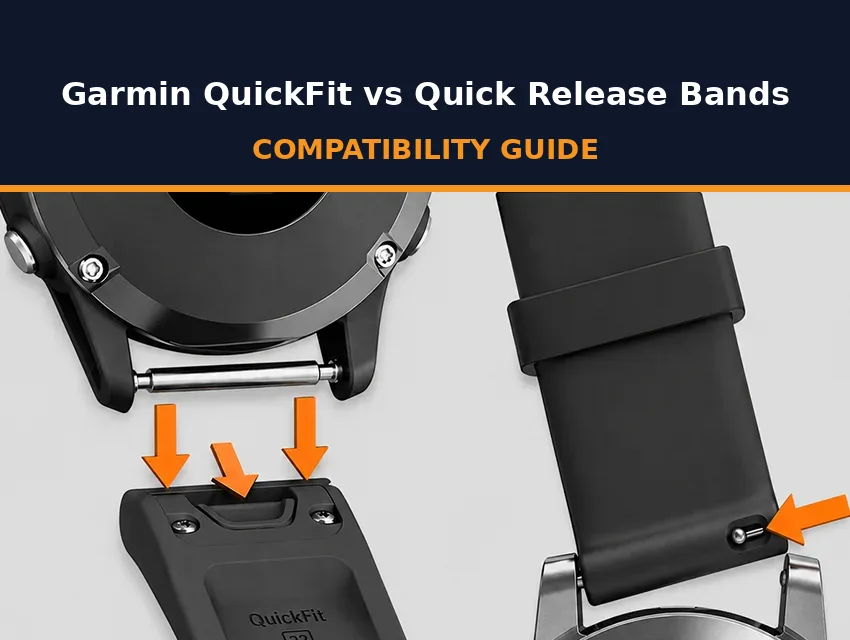
Buying a replacement strap for your Garmin Instinct 3 is easy once you know what size strap you need. The Instinct 3 comes in two sizes: the Instinct 3 45mm takes QuickFit 22, and the 50mm takes QuickFit 26. Check which one you have before you order, so your new band fits the first time.
Once the right band is in your hand, the swap is fast and easy. Your first strap change will take one extra step because of how the stock band attaches, and every swap after that takes only a moment.
Key Takeaways
- The Instinct 3 45mm takes QuickFit 22 bands, and the 50mm takes QuickFit 26 bands.
- Solar, AMOLED, and Tactical Edition models follow their case size, so shop by 45mm or 50mm, not by feature.
- The band the watch ships with is held by a thick watch pin that you push in to remove the band.
- To switch to QuickFit, remove the pin from the original band, refit the pin across the lugs, and press the QuickFit band on until the latch clicks closed.
- After the first switch, every swap can be done by hand: slide the latch, lift the band off, and press the new one on.
How the Instinct 3 Band System Works
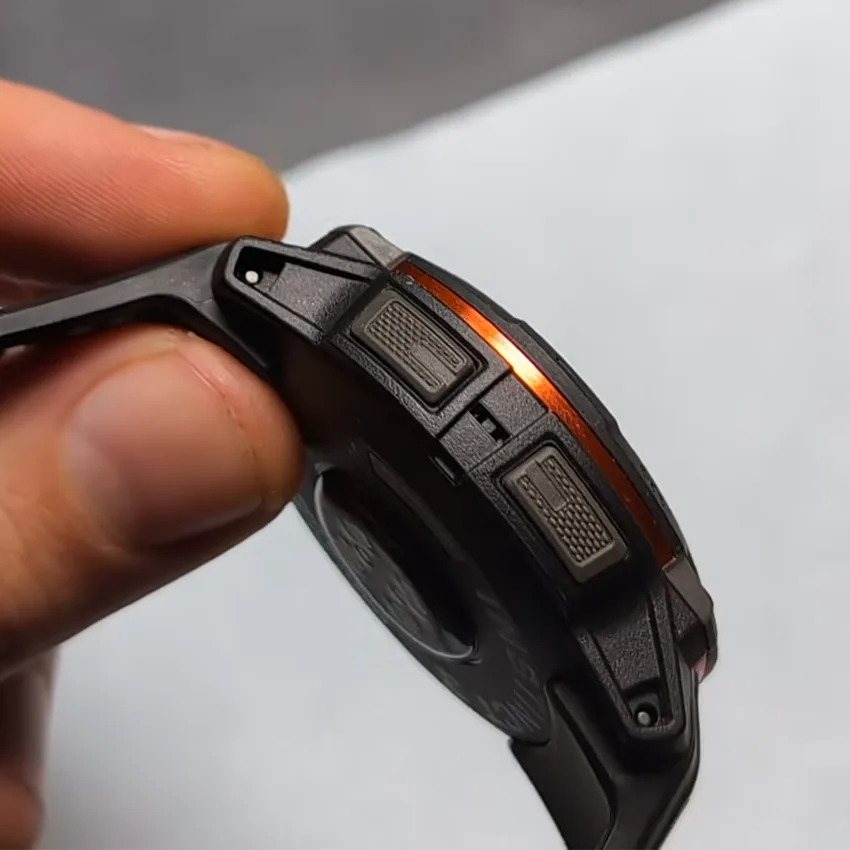
The Instinct 3 doesn’t use quick-release spring bars, and out of the box it doesn’t wear a QuickFit band either. The band it ships with is held by a thick, spring-loaded watch pin that runs through the end of the band and into the lugs. You push that pin in to take the band off.
That same pin is what makes the watch QuickFit-compatible. Fit the pin across the lugs on its own, and the latch on a QuickFit band clicks closed over it. Any compatible QuickFit band in the right size will fit, whether it’s made by Garmin or another brand.
Do You Need Tools?
QuickFit bands are designed to be swapped out tool-free. However, you do need a small tool to remove the original band.
The watch pin on the stock band is small, so it helps to have something thin to push it in. The pin-pusher end of a spring bar removal tool is made for the job, and a thin paper clip will often do in a pinch, as long as you’re careful not to scratch the device. Beyond that, a soft surface to rest the watch on is all you really need.
Check Your Instinct 3 Case Size First
The most common mistake is ordering a band for “Instinct 3” without checking which size case you have.
The Garmin Instinct 3 comes in two sizes, 45mm and 50mm. Those numbers are the case size, meaning the diameter of the watch case. The case size determines which QuickFit size your Instinct 3 takes.
If you don’t know your exact Instinct model off the top of your head, don’t panic. The model name is printed on the case back, and it’s also listed in your device details in Garmin Connect. If you already have a QuickFit band for it, look for the millimeter number stamped near the connector end. A 22 means QuickFit 22, and a 26 means QuickFit 26.
There are different versions of the Instinct 3, including Solar, AMOLED, and the Tactical Edition. These features don’t affect the QuickFit size.
| Instinct 3 model | QuickFit size |
|---|---|
| Instinct 3 45mm, all versions | QuickFit 22 (22mm) |
| Instinct 3 50mm, all versions | QuickFit 26 (26mm) |
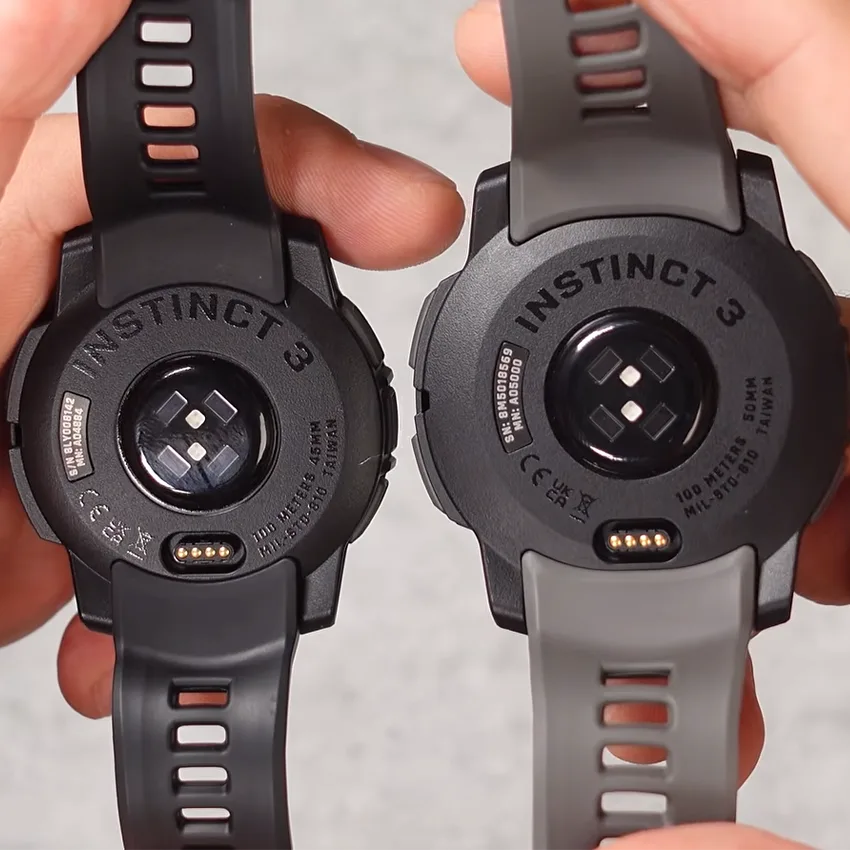
Once you know your case, our Garmin Instinct strap listings clearly indicate what model they are for, so you can match at a glance.
How to Remove the Stock Instinct 3 Band
The band your Instinct 3 came with can be removed by pushing in the watch pin.
- Lay the watch face-down on a soft surface so the screen and bezel don’t get scratched.
- Find the spot on one side where the band meets the lugs.
- Push in the watch pin with the tip of your tool or a paper clip.
- While you hold the pin in, lift that end of the band away from the lug holes.
- Slide the watch pin out of the band and keep it, because you’ll fit it across the lugs for your QuickFit band.
- Repeat on the other side.
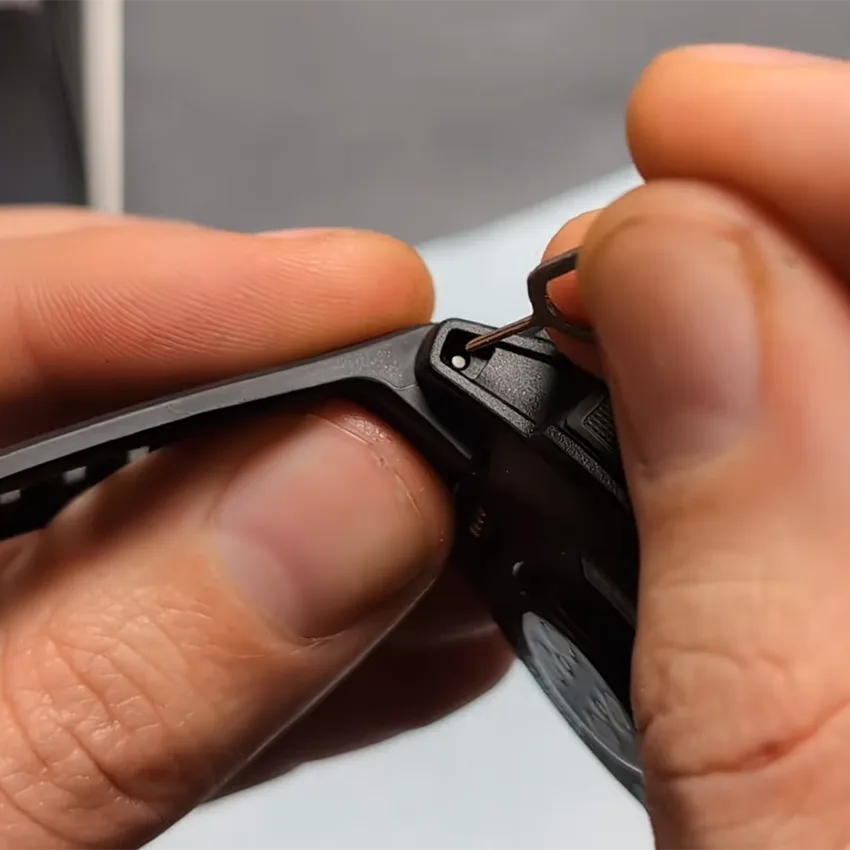
Don’t force the pin out: Pulling on the band before the pin moves puts strain on the lugs. If the pin feels stuck, press again with steady pressure, and don’t pry at it with a knife or a screwdriver, because that can gouge the case.
How to Switch to a QuickFit Band
Once the original band has been removed, your Instinct 3 is ready for QuickFit bands.
- Press in the ends of the watch pin, line them up with the lug holes, and let it spring into place so it sits in both holes.
- Line the latch on the QuickFit band up with the pin.
- Press the band into place until you feel and hear the latch click closed over the pin.
- Repeat on the other side.
Check both sides before you wear it: Give each end a gentle tug before the watch goes back on your wrist. If a band lifts or shifts, it isn’t secure yet, so seat the pin again or press the latch down until it closes.
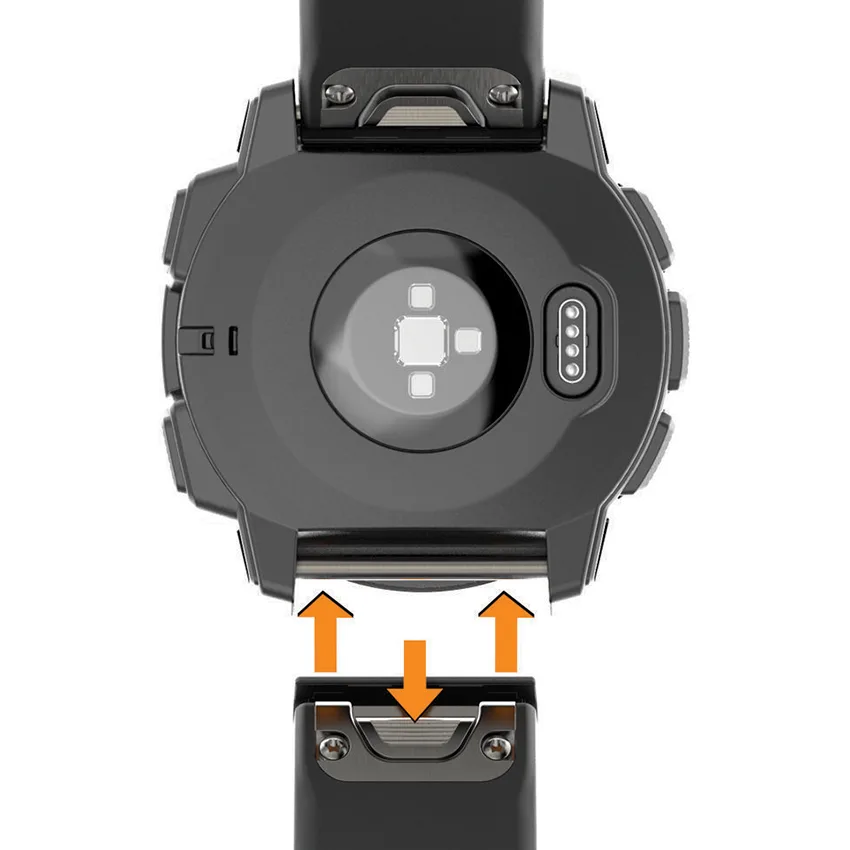
If you ever want to go back to the original band, simply remove the QuickFit band and the pin, thread the pin back into the old band, and reinstall it on the watch the same way it was removed: push in the pin, align it with the lug holes, and release the pin to lock it back in place.
How to Swap QuickFit Bands After That
Once your Instinct 3 is on QuickFit, every subsequent swap can be done in seconds:
- Slide the latch on the band’s QuickFit connector open.
- While you hold the latch open, lift the band off the watch pin.
- Line the new band’s connector up with the pin and press it down until the latch clicks closed.
The pin stays on the watch, ready for the next band.
Troubleshooting Common Instinct 3 Band Issues
These four issues cover most problems with an Instinct 3 band, from a band that won’t fit to one that’s ready to retire.
The Band Is the Wrong QuickFit Size
A QuickFit 22 band won’t fit the Instinct 3 50mm, and a QuickFit 26 band is too wide for the 45mm. No amount of pressing fixes that, so check that the listing names your case size before you reorder.
The Latch Won’t Close or the Band Moves
A QuickFit latch needs a watch pin to close over. If there’s no pin across the lugs, or the pin isn’t sitting in both holes, the latch has nothing to grab.
A band that shifts from side to side is also likely not properly latched onto the device. Take the band off, seat the pin in both holes, and press the band back on. If it’s still wiggling, check the connector and brush away any dust or grime that could be preventing it from clicking on completely. If that doesn’t help, it’s possible your connector is loose and you’re ready for a replacement band.
A Dirty Watch Strap
To clean your watch strap, remove it from your device and rinse it with water or wipe it with a damp, lint-free cloth, then let it dry all the way. Keeping the watch clean and dry, and not wearing it too tight, can help reduce skin irritation. Cleaning methods vary by material, so match your cleaning routine to your band’s material.
Signs It’s Time for Another Band
Look for cracks by the connector, tears at the adjustment holes or keeper loop, rubber that’s getting thin, or color bleeding out of the strap. These are the most common ways Garmin bands break, and they increase the risk of your watch falling off, so replace the band before it gives out halfway up a trail.
Final Thoughts
Changing your Instinct 3 band takes one extra step the first time, since the stock band’s watch pin has to come out and go across the lugs. After that, every swap is a tool-free QuickFit click, as long as you match QuickFit 22 to the 45mm or QuickFit 26 to the 50mm.
When you’re ready to swap out your Instinct 3 strap, there are plenty of materials and styles to choose from. Elite FKM rubber, canvas, leather, and titanium bands each suit different needs, so pick based on how you wear the watch.
Which band is going on your Instinct 3 next?
Frequently Asked Questions
Does the Garmin Instinct 3 use QuickFit bands?
Yes. The Instinct 3 ships with a different kind of band, held in place by a thick, spring-loaded watch pin. Once you remove the original band and fit that pin across the lugs on its own, the watch is fully compatible with QuickFit bands, and every swap after that is done by hand with no tools.
What size band does the Garmin Instinct 3 take?
The Instinct 3 45mm takes QuickFit 22 bands, and the Instinct 3 50mm takes QuickFit 26 bands. The QuickFit number is the band’s width in millimeters, so a 22mm QuickFit band fits the 45mm and a 26mm QuickFit band fits the 50mm. Check your case size on the case back or in Garmin Connect before you order.
Do the Instinct 3 Solar, AMOLED, and Tactical Edition take different bands?
No. The band size depends only on the case size, not the display or edition. Every Instinct 3 45mm, whether it’s a Solar, AMOLED, or Tactical Edition, takes QuickFit 22 bands, and every 50mm version takes QuickFit 26. When you shop, look for a listing that names your case size rather than your edition.
Do I need a tool to change my Garmin Instinct 3 band?
Only the first time. The band the watch ships with is held by a small watch pin, and a spring bar removal tool or a thin paper clip makes it easier to push in. Once you’ve switched to QuickFit, every swap after that is tool-free: slide the latch, lift the band off, and press the new one on.