Ordering a replacement band for your Garmin device should be easy, but there are a couple of factors that can trip people up. While the majority of Garmin devices use a standard quick-release spring bar system or Garmin’s QuickFit connector, the Garmin Forerunner 235 uses neither.
The Forerunner 235 uses a dual-screw threaded pin assembly, the same system Garmin used on several older Forerunner models. Each pin has a tiny star-shaped Torx screw head, so you can change the band with a precision Torx screwdriver.
When shopping for a new strap for the Forerunner 235, you’ll need to look for a compatible watch band or purchase a strap adapter to make the device compatible with 20mm quick-release straps.
Key Takeaways
- The Forerunner 235 uses a proprietary screw-pin fitting, so standard bands can’t attach to it directly.
- Bands built for this model can be installed straight on. You just need to find a strap with the proper connector.
- Strap adapters are another option for the Forerunner 235, giving you a standard lug that takes a 20mm quick-release strap.
- Buying a new band based on width alone is the most common mistake on this model, and it usually ends in a return.
- Removing and replacing the band is simple with a small screwdriver, and if you use an adapter, every swap afterward is tool-free.
Why an Ordinary Band Won’t Fit
The industry-standard connector for most watches is a quick-release spring bar, a small sprung pin that clicks into tiny holes in the lugs of your device. Many Garmin watches use the proprietary QuickFit connector, where a latch on the end of the band clips onto a fixed bar between the lugs on the device.
However, there are a handful of Garmin devices that use neither of those connector types, including the Forerunner 235. Each end of its band slots into a recess molded into the case and is held by a screw pin, a short metal bar fastened with a tiny screw at each end. There’s no open gap between lugs to measure and no standard part that fits with it.
When you’re buying a quick-release or QuickFit band, you need to know your size or lug width. The Forerunner 235 sidesteps the need for those measurements because its connector only comes in one size. If you opt to install an adapter, your device will be able to use conventional quick-release spring bars, like a traditional watch.
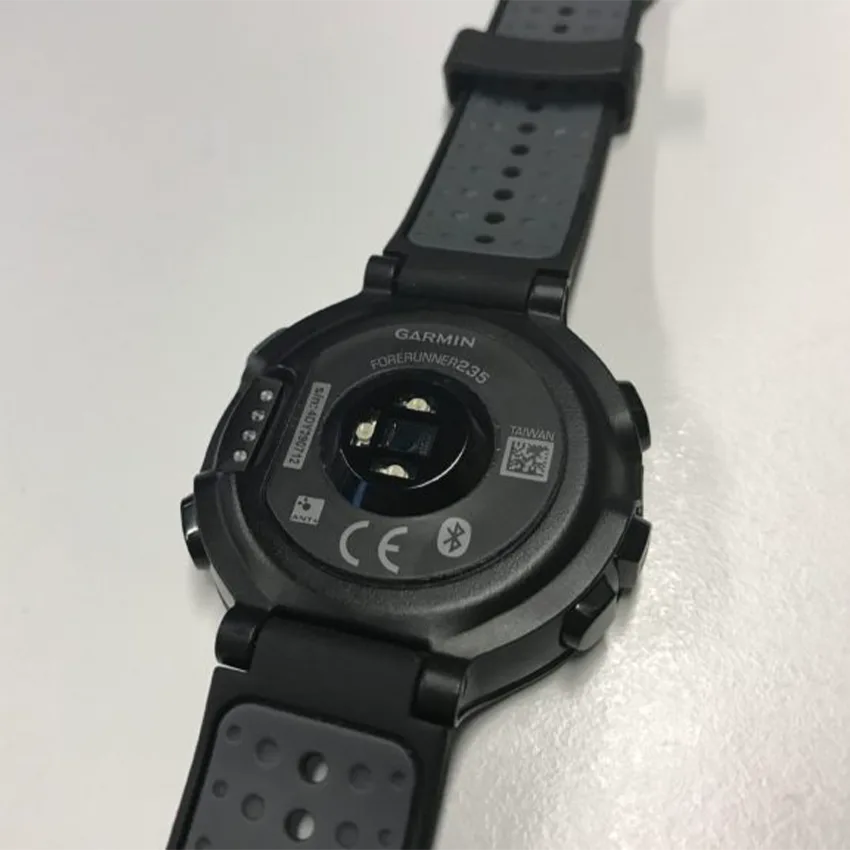
When purchasing a new Garmin strap, it’s crucial to first determine which Garmin model you have so you get the right replacement.
What You Need for Replacement and Installation
You’ll need a small Torx screwdriver, ideally two, to remove the original band and to fit the new band or adapter, because both are held by screw pins. Some Forerunner 235 bands, like our silicone rally strap, come with the tools for strap replacement, and you can buy replacement screw pins separately. Most precision screwdriver kits already come with a small Torx screwdriver, so it’s possible you already own one if you’ve bought a kit to repair glasses or electronics.
Make sure the screwdriver tip sits snugly in the screw head before you turn it. A tip that slips will strip the head, and then the screw is very hard to remove.
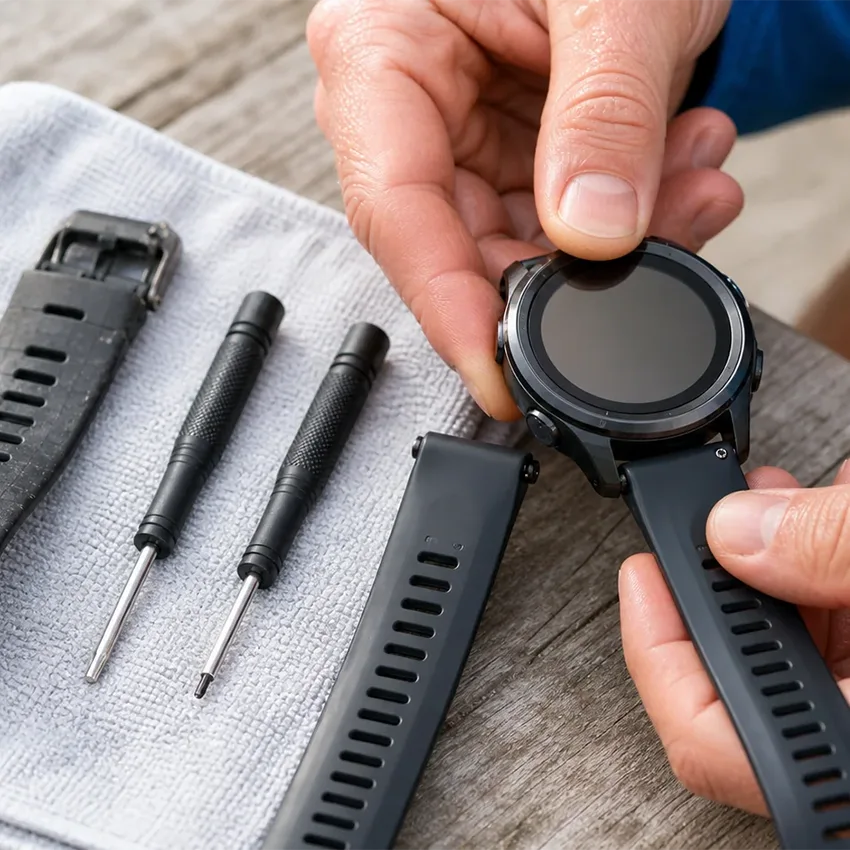
If you opt to install a quick-release adapter, future strap replacement becomes simpler and doesn’t require any tools.
How to Remove the Forerunner 235 Band
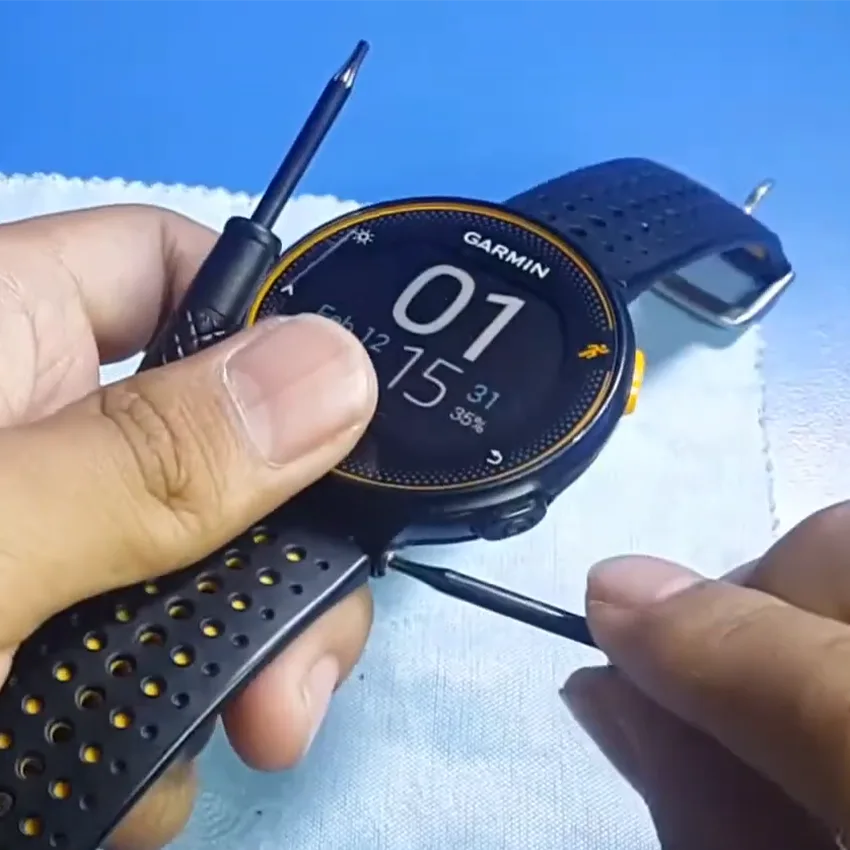
Work on a soft surface. A folded towel will stop the watch from sliding, prevent screen scratches, and catch a screw if one drops.
Here’s how to take the original band off:
- Turn the watch face down so you can see where the band meets the case.
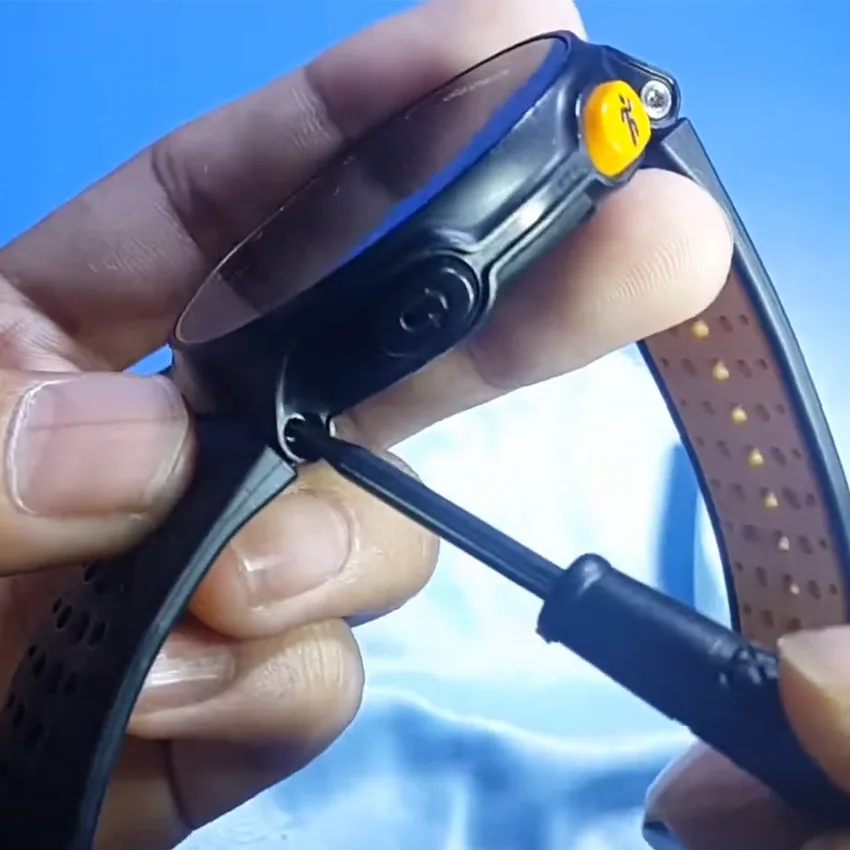
- Find the screw heads on either side of the case where the band seats into the watch body.
- Hold the screw head on one side steady with one screwdriver so the pin doesn’t spin.
- Use the second screwdriver to unscrew the opposite side counterclockwise until it comes free, then slide the pin out.
- Lift that end of the band clear and keep the pin and screws somewhere safe.
- Repeat on the other side.
How to Replace the Forerunner 235 Band
A band built for the Forerunner 235 goes on with the same screw pins that held the original. Use the new pins if your band includes them, or reuse the originals if they’re in good shape.
Here’s how to fit it:
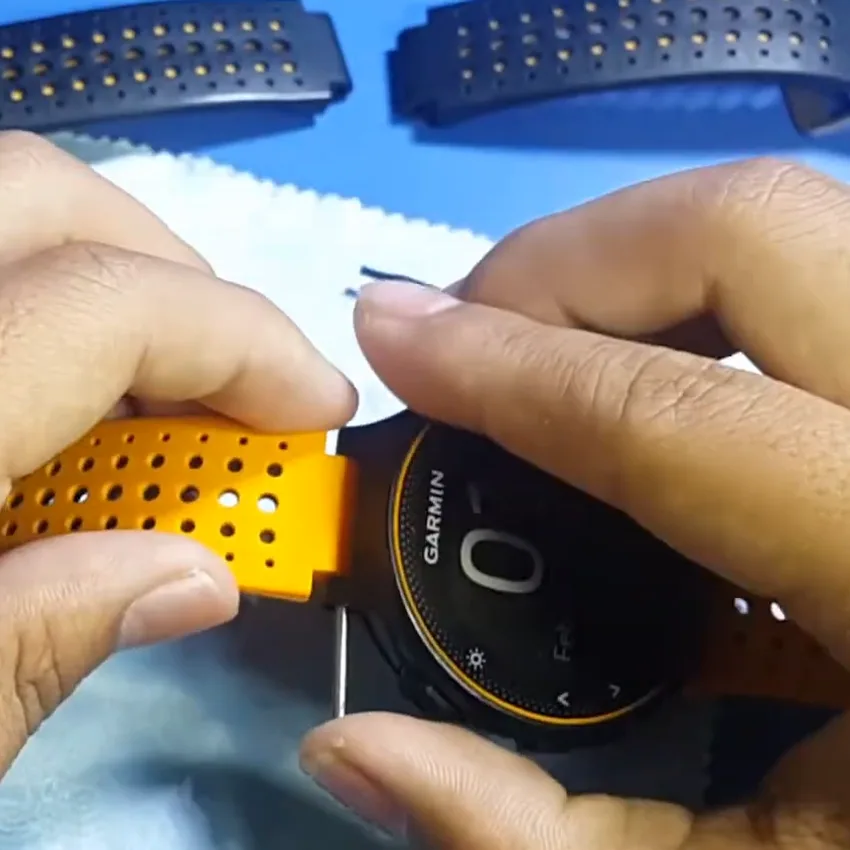
- Keep the watch face down on the soft surface and check that the slots on both sides of the case are clear.
- Take the half of the band with the buckle and line it up with the top of the watch, at the 12 o’clock side. The half with the holes goes on the bottom, at the 6 o’clock side.
- Slide the end of the band into the slot so the hole in the band lines up with the holes in the case.
- Push the screw pin through the case and the band.
- Hold one screw head steady and tighten the other side clockwise until it’s snug. Don’t force it, because the threads are tiny and strip easily.
- Repeat with the other half of the band, then tug both ends to make sure neither one moves.
How to Install the Strap Adapter
The adapter goes on the same way as a band built for the 235, using the same screw pins. Each adapter has a narrow end that fits into the slot on the watch case and a wider 20mm end where your new strap attaches.
Here’s how to fit it:
- With the watch face down on a soft surface, slide the narrow end of one adapter into the slot on one side of the case, with the 20mm end pointing away from the watch.
- Line up the hole in the adapter with the holes in the case.
- Push the screw pin through the case and the adapter.
- Hold one screw head steady and tighten the other until it’s snug, without forcing it.
- Repeat with the second adapter on the other side.
Don’t skip: Tug on each adapter after it’s installed to make sure it’s attached properly. The adapter carries the whole weight of the watch, so you need it to be stable.
How to Install a Standard Quick-Release Band on the Adapter
After you’ve installed a quick-release adapter on your Forerunner 235, watch strap replacement takes seconds.
Here’s how to install a 20mm quick-release band:
- Hold the band so the buckle half goes at the top of the watch, at the 12 o’clock side, and the half with the holes goes at the bottom, at the 6 o’clock side.
- Fit one end of the spring bar into the small hole on one side of the adapter’s 20mm end.
- Slide the quick-release lever to pull the other end of the pin back.
- Line the band up between the two sides of the adapter, then release the lever so the pin clicks into the opposite hole.
- Repeat with the other half of the band, then tug both ends before you wear it.
Troubleshooting Common Forerunner 235 Band Issues
These four problems cover most snags with a Forerunner 235 band.
The Band or Adapter Feels Loose
The most common cause is a screw pin that isn’t fully tightened. Take the pin out, line the holes up properly, and tighten it again while holding the opposite screw head steady. If it still moves, the screw threads may be worn, and a fresh set of screws usually fixes it. If an adapter still moves after new screws, stop using it and replace it, because it carries the whole weight of the watch.
You Ordered a Band by Width and It Won’t Attach
This is the most common problem, and nothing is faulty. A standard band can’t attach to the Forerunner 235 on its own, whatever its width. You have two fixes: exchange it for a band made for the 235’s screw-pin connector, or, if it’s a 20mm quick-release band, fit an adapter and keep the band you bought.
The Original Band Tore Where It Meets the Watch
The band flexes hardest right where it attaches to the device, so that’s typically where the material gives out first. Before you fit a new band or adapter, check that no torn piece is still stuck in the slot, or the new part won’t sit flat against the case.
If the Keeper Loop Breaks Instead of the Band
The keeper loop is the small loop that holds the tail of the strap in place. It stretches every time you put the watch on, so it often splits before the band itself does. Replacement keepers for the original Garmin band are hard to find, so most owners end up replacing the whole band. A new band, whether it’s built for the 235 or a 20mm strap on an adapter, usually comes with its own keeper.
Which Other Garmin Bands Fit a Forerunner 235?
There are various Garmin models that use this specific screw-pin connection system. The Forerunner 220, 230, 235, 620, 630, and 735XT all use the same system, and their bands are meant to be interchangeable, which is why our range covers them on one page.
According to users online, the original bands for the 230, 235, and 630 models differ in softness and hole pattern, even though they attach the same way. If comfort matters to you, check the listing photos and details before you swap a band between models.

Whichever model you have, match the listing to it before you order, and ask if your model isn’t named.
Where to Get a Replacement Band
The best material for your watch strap depends on your own preferences and how you use your Garmin.
Choose a material according to what the watch goes through in a normal week. If it sees sweat every day, go with silicone or rubber, which rinses clean under a tap. For hot weather, nylon straps breathe and dry quickly. For desk days or travel, leather looks sharp, but it doesn’t hold up well to sweat, so keep it off your training runs. Our range of Forerunner 235 watch straps covers silicone, nylon, and leather, plus a stainless steel bracelet.

If you’ve opted to install an adapter on your device, you’ll be shopping for 20mm quick-release straps, which can offer even more options.
Band and Adapter Care
Rinse the band with fresh water after a long, hard workout session and let it dry before you put it back on. Dried sweat and salt collect around the screws and pins, which can make the strap look dirty and smell over time.
Check the adapter every few months by holding the watch and gently moving the band. Any play means a screw has loosened or the pins are wearing.
Cleaning methods vary by material, so match your cleaning routine to your band’s material.
When to Replace Rather Than Repair
There are plenty of reasons why Garmin bands break or wear out. Replace the band when the material splits, goes tacky, or the holes have stretched enough that it sits in a different position each time. Replace the adapter when there’s movement between it and the case that tightening the screws doesn’t fix.

Your Forerunner 235 Swap Is Done
The Forerunner 235 takes a few extra minutes to change because of its screw pins, but it’s an easy job once you know what you’re working with. For the simplest swap, pick a band built for the 235’s connector and fit it with the same screw pins. If you’d like a wider range of styles, fit a 20mm adapter once, and every change after that is tool-free.
Which route are you taking?
Frequently Asked Questions
What size watch band fits the Garmin Forerunner 235?
The Forerunner 235 takes bands made specifically for its screw-pin connector, rather than a band sized by lug width. These bands are usually listed for the Forerunner 220, 230, 235, 620, 630, and 735XT, since they all share the same connector. If you’d rather use standard straps, a compatible strap adapter lets the watch take any 20mm quick-release band.
Where can I find a replacement band for a Garmin Forerunner 235?
StrapsCo carries replacement bands built for the Forerunner 235 in silicone, nylon, leather, and stainless steel. They’re designed for the screw-pin connector shared by the Forerunner 220, 230, 620, 630, and 735XT, so they attach with the watch’s own screw pins. If you’d rather shop standard straps, fit a 20mm adapter first and choose any 20mm quick-release band.
How do you remove a Garmin watch band without a tool?
Quick-release and QuickFit bands come off without any tools. On a quick-release band, you slide the small lever on the spring bar and lift the band away. On a QuickFit band, you open the latch and lift the band off the bar. The Forerunner 235 is different, because its band is held by screw pins, so you’ll need a small screwdriver. Once an adapter is on, later swaps are tool-free.
Do Forerunner 230 and 630 bands fit the 235?
Yes. The Forerunner 230, 235, and 630 share the same screw-pin connector, so bands made for one fit the others. Garmin’s original bands for these models differ slightly in softness and hole pattern, but they attach the same way. Match the listing to your exact model, and ask if your model isn’t named on it.